Voice GPS - Maps & Navigation
- 4.2
- Rating
- 100.00K
- Installs
- Free
- Price
 Analysis by App-foxy
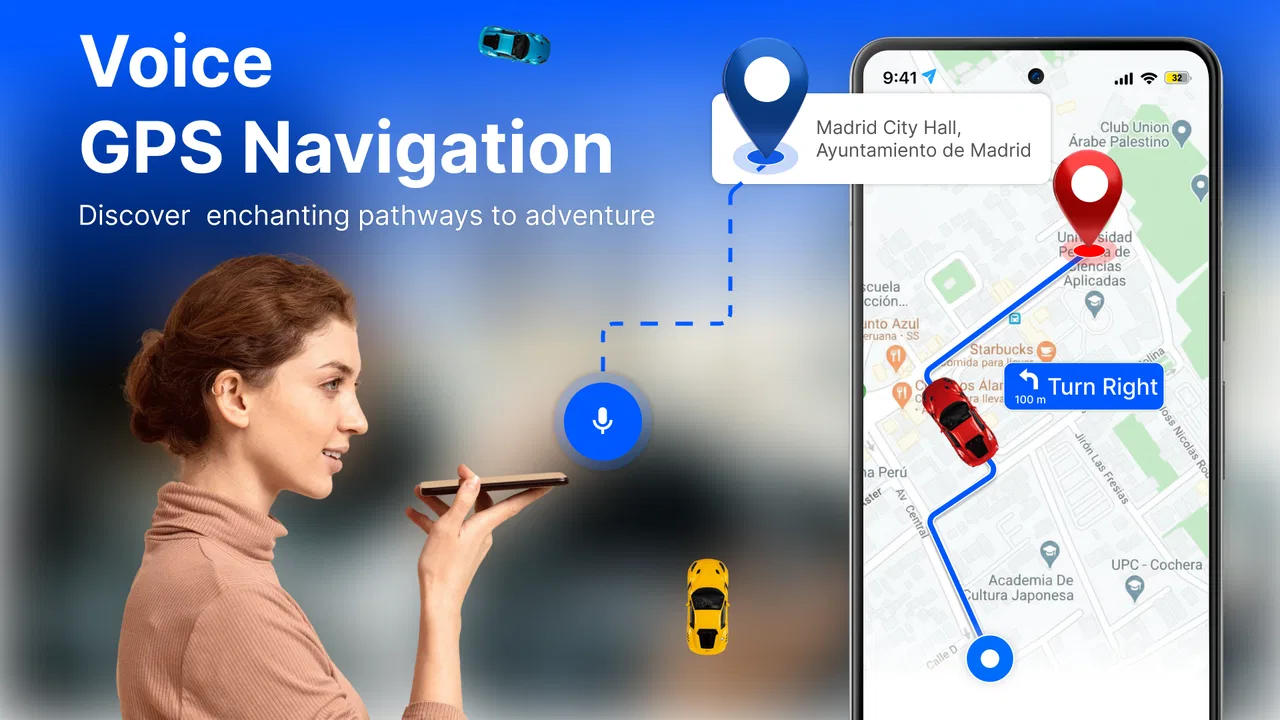
Voice GPS - Maps & Navigation is the kind of travel app I reach for when I want directions to stay simple: enter a destination, follow a route, and let spoken guidance handle the next turn. I found its appeal less about replacing every mapping tool on my phone and more about bringing the essential navigation view, route planning, street imagery, and weather context into one travel-focused experience. That combination makes it useful for everyday driving, short trips, and unfamiliar neighborhoods where a quick visual check can prevent a wrong turn.
It is a free Travel & Local app from TALYMIND APPS LTD, with optional in-app purchases ranging from $3.99 to $17.99 per item. The audience is broad because its content rating is Everyone, and the app runs on Android 7.0 or later. The current version is 1.44, while its public release date is January 18, 2026. I would describe it as a practical companion rather than a complete replacement for every specialist navigation service.
How Voice GPS feels when the network is part of the journey
The first thing I pay attention to with a navigation app is how much of the experience depends on a reliable connection. Voice GPS - Maps & Navigation brings together several functions that naturally rely on changing information: route guidance, map views, street view, and live weather. That makes connectivity especially important during the moments when I am planning or adjusting a trip.
You May Also Like

 Blood Strike: 2.5 Anniversary
Blood Strike’s Loadouts Turn Every Drop Into a Tactical Gamble
A close look at Blood Strike’s custom loadouts: how fast access to signature weapons reshapes its battle royale rhythm, rewards preparation, and narrows the gap between fights.

 Pandora - Music & Podcasts
Pandora’s Music Is Easy to Start, but Harder to Recover
Pandora’s strength is its low-effort path from a seed to a station. Its weak spot is how much confidence it asks you to place in connection, setup, and quiet recovery.

 8 Ball Pool
 Is Built on Rivalries, Rematches, and Routine
A close look at the rivalries, rematches, shared routines, and unanswered safety questions that turn a quick pool match into a persistent mobile community.

 Samsung Music
’s Quiet Strength Is Playing What You Already Own
Its reach comes less from spectacle than from dependable access to a personal library. That simplicity is both the app’s strongest retention engine and its ceiling.

 AccuWeather: Weather Radar
AccuWeather Review: A Quick, Clear Forecast for Everyday Decisions
For everyday plans, the best forecast is the one you can understand quickly. AccuWeather makes rain timing, radar, and local conditions easy to act on, with a few trade-offs.

 Hill Climb Racing
Why Hill Climb Racing Still Turns Crashes Into One More Run
A tiny car, a bumpy hill and one more upgrade: Hill Climb Racing keeps resurfacing because its simple chaos makes every near-miss feel personal.
More From Our News Desk



When the signal is stable, the app’s appeal is clear. I can look at a route, switch from a conventional map perspective to a more visual street-level view, and consider the weather before leaving. I like that workflow because it reduces the need to jump between a navigation app and a separate weather service. A rainy forecast, strong wind, or sudden change in conditions can affect whether I leave early, choose a different road, or avoid walking a longer exposed route.
The trade-off is that these connected functions are not equally useful when the network becomes unreliable. A route that needs to be recalculated after a missed turn is a different experience from a route that was already visible a moment earlier. Live weather is also valuable precisely because it changes, so it is the feature most obviously tied to current connectivity. I would check the route and surrounding area before moving, rather than assuming that every map detail will remain equally available throughout a weak-signal journey.
That habit is important in places such as underground car parks, rural roads, dense city blocks, and large buildings. A navigation screen can appear reassuring while the phone is still catching up with the latest position or route information. My practical advice is to pause safely before a trip, inspect the overall route, and remember the next major road or landmark. Voice prompts are helpful, but they should support attention rather than replace basic awareness of where the journey is heading.
Planning before leaving makes a bigger difference than people expect
I get more value from the app when I use it as a preparation tool instead of opening it only after I am already moving. Before setting off, I can compare the route with the surrounding streets, use street view to recognize an entrance or junction, and check the live weather for the conditions I am about to face. That small preparation step can be more useful than repeatedly staring at the screen once the trip has started.
Street view is particularly helpful for the final part of a journey. A destination pin may be accurate, but the actual entrance could be on a side street, behind a building, or beside a confusing junction. Looking at the nearby surroundings in advance gives me a visual reference that spoken instructions alone may not provide. I would use it before visiting an unfamiliar clinic, hotel, office, or event venue, especially when arriving at the correct building matters more than simply reaching the right neighborhood.
There is also a useful distinction between route confidence and route certainty. Seeing a route on a map does not guarantee that traffic, road access, or local conditions will remain unchanged. The app helps me understand the planned path, but I still treat it as guidance. If the trip is time-sensitive, I would leave room for delays and verify the destination details before starting rather than relying on the screen to solve every last-minute problem.
Mobile use is strongest when the screen can stay secondary
The voice-guidance focus suits drivers who want directions without constantly reading a map. In my experience, spoken instructions are most useful when I set the destination before moving and keep the phone positioned where I can hear it clearly. This reduces the temptation to handle the device at every junction. I still prefer to check the visual route while stationary, because voice directions make more sense when I already understand the road sequence.
For pedestrians, the app can be useful in a different way. A walker may care less about driving lanes and more about recognizing the final approach to a destination. Street view can help identify the correct entrance, while the map provides the broader orientation. Weather information becomes more meaningful here too: a short walk in dry conditions is not the same as a longer route during heavy rain. I would use the app to make that decision before leaving, not as a reason to keep looking down while crossing streets.
Passengers can make better use of the visual side of the app. They can inspect alternative roads, look at nearby landmarks, and help confirm whether the vehicle is approaching the right turn. This is one of the situations where the combination of voice guidance and visual mapping feels more flexible than a voice-only tool. The driver can listen while the passenger handles the deeper inspection.
On a phone with a smaller display, I would keep the workflow deliberately focused. Use the map to understand the route, use street view for a specific question, and return to the guidance screen. Trying to study every available detail while traveling creates more distraction than benefit. The app is at its best when each feature has a clear job rather than when all views are treated as equally important throughout the journey.
What to do when a route or connection does not behave as expected
Every navigation app has awkward moments, and connectivity is often where they appear first. A route may need attention after a wrong turn, a map view may take longer to refresh, or live weather may not update at the moment I want it. I do not see those possibilities as a reason to dismiss Voice GPS - Maps & Navigation, but they do affect how I would prepare for a journey.
My preferred recovery routine is simple. If I miss a turn, I avoid making a sudden maneuver and wait until I can stop safely or reach a suitable place to reassess. I then check whether the route has adjusted, confirm the destination, and compare the new path with the road I can actually see. This matters because blindly following a new instruction can be worse than taking a safe extra minute to understand it.
If the map seems slow, I would first reduce the number of things I am asking the phone to do. Close unrelated apps, stop switching between views, and give the navigation screen a moment to settle. I would also avoid repeatedly tapping the destination or route controls, since that can make it harder to tell whether the app is processing a request or whether I have accidentally changed the plan.
For a trip through areas known for weak reception, I would prepare a second layer of orientation. That might mean noting the main roads, remembering a prominent landmark, or checking the destination’s location before departure. This is not a claim that the app provides a particular offline mode; it is simply sensible travel practice when any connected navigation service may become less responsive. Voice guidance should be treated as assistance, not as the only source of direction.
Weather deserves its own recovery habit. If the live forecast is important to the decision, I would check it shortly before leaving and again only when safely stopped. A weather panel is useful for context, but it cannot remove the need to adapt to what is visibly happening outside. If conditions change during the trip, common sense remains more reliable than trying to force a refreshed screen while moving.
Using the app without wasting mobile data
Because this app combines maps, street-level imagery, route changes, and live weather, I would use it thoughtfully on a limited mobile-data plan. The biggest practical saving is to separate planning from driving. At home or on a dependable connection, inspect the route, look at the destination surroundings, and decide whether the weather affects the trip. Once moving, stay on the essential guidance view instead of repeatedly loading visual details that do not answer a current question.
Street view is the feature I would use most selectively. It can be excellent for identifying a final entrance or a confusing junction, but browsing many locations along an entire route is unnecessary for most journeys. I would reserve it for the places where a visual reference genuinely reduces uncertainty. That approach also keeps the app’s purpose clear: street view is a planning aid, while voice guidance is the travel aid.
Live weather is similarly best used at decision points. Check it when deciding whether to leave, whether to carry rain protection, or whether a walking route remains sensible. There is little benefit in repeatedly refreshing it during a short trip unless conditions are changing quickly. A focused routine makes the app feel lighter and avoids turning useful information into constant screen activity.
Users should also remember that battery and data are connected concerns. A navigation session with the screen active, location tracking in use, and map content updating can be demanding on a phone, even when the route itself is straightforward. I would begin longer outings with a reasonable charge, keep the display as calm as practical, and carry a charging option for extended driving. These are not glamorous tips, but they make the difference between a convenient navigation tool and a stressful one late in the journey.
Who will appreciate it, and who should choose another tool?
I think Voice GPS - Maps & Navigation is a good fit for someone who wants a straightforward voice GPS experience with a few useful travel layers around it. A casual driver visiting unfamiliar places, a passenger helping with route checks, or a walker who wants to inspect a destination before arriving can all find a sensible use for it. The free entry point also makes it easy to try without committing to a purchase, while the optional purchases give the app a monetized path beyond its basic availability.
The app is less convincing for people who need highly specialized navigation. A professional driver may want features designed around commercial vehicles, detailed trip records, or work-specific routing. Someone planning remote travel should be especially cautious about depending on a connected experience without preparing for weak reception. Likewise, users who want a full travel-planning suite, public-transport detail, or a community-driven traffic ecosystem may find a dedicated alternative better suited to those priorities.
Compared with using a general map service plus a separate weather app, the main advantage here is concentration. Route guidance, street view, and weather sit within one travel workflow, so I spend less time switching tools. The disadvantage is that a specialized service may go deeper in one area. A dedicated weather app can offer a richer forecast experience, while a mature mapping platform may provide broader location information or more established traffic detail. I would choose this app when simplicity and a combined view matter more than having the strongest specialist feature in every category.
The rating is encouraging: it holds a 4.6 average from around 35 ratings and has collected around 14 written reviews. Its reach has also passed 100,000 installs, which suggests that it has moved beyond being an obscure experiment. I would still interpret those figures as a useful signal rather than a guarantee that every phone, region, or driving situation will feel identical. Navigation quality depends heavily on the device, connection, local map coverage, and how carefully the user prepares.
My practical verdict on connected navigation
After looking at the way its features work together, I see Voice GPS - Maps & Navigation as a convenient everyday option for people who want spoken directions without giving up quick access to visual route checks, street view, and live weather. Its strongest experience comes from a short routine: plan while connected, inspect the tricky parts of the destination, check the weather, then let voice guidance take over while traveling.
The best way to use this app is to make connectivity work for preparation, not to depend on it blindly at every second of the journey. That mindset addresses its main weakness without taking away its convenience. I would not choose it as my only safety net for a remote trip or a demanding professional route, but I would happily keep it for ordinary drives, unfamiliar addresses, and quick weather-aware travel decisions.
With its Everyone rating, Android 7.0 compatibility, free starting price, and current version 1.44, it is approachable for a wide range of users. The optional purchases mean I would review the available choices before paying, especially if I only need occasional navigation. Overall, TALYMIND APPS LTD has created a focused travel app that earns its place when I want directions, a visual sense of the destination, and weather context in one mobile experience.
FAQs for Voice GPS - Maps & Navigation
01What are the main features of Voice GPS - Maps & Navigation?
Voice GPS - Maps & Navigation offers real-time voice-guided navigation, live traffic updates, route optimization, and offline maps. It also includes features like speed limit alerts, lane guidance, and points of interest along the route. The app is designed to enhance your driving experience by providing accurate and timely information.
02Does Voice GPS - Maps & Navigation work offline?
Yes, Voice GPS - Maps & Navigation allows users to download maps for offline use. This is particularly useful when traveling in areas with limited internet connectivity. By downloading maps in advance, you can ensure uninterrupted navigation and avoid any potential data charges while on the road.
03How accurate is the live traffic information in Voice GPS - Maps & Navigation?
The app uses real-time data from various sources to provide accurate traffic information. It updates continuously to reflect current traffic conditions, helping users avoid congestion and select the fastest route. While generally reliable, traffic conditions can change rapidly, so it's always good to stay alert.
04Is Voice GPS - Maps & Navigation user-friendly for beginners?
Absolutely, the app is designed with a user-friendly interface that is easy to navigate. Voice commands and intuitive menus guide users through the setup and navigation process. Even those new to GPS apps will find it straightforward to enter destinations and follow directions, making it accessible for all skill levels.
05Are there any in-app purchases or subscriptions in Voice GPS - Maps & Navigation?
While the basic version of Voice GPS - Maps & Navigation is free, there are optional in-app purchases and subscriptions available. These might include premium features such as ad-free usage, advanced navigation options, or additional map downloads. Users can choose to upgrade based on their specific needs and preferences.
Pros
- User-friendly interface with intuitive controls.
- Accurate real-time traffic updates.
- Voice guidance enhances hands-free use.
- Offline maps available for remote areas.
- Customizable route options for flexibility.
Cons
- High battery usage during navigation.
- Ads can be intrusive at times.
- Limited features in free version.
- Requires data for live traffic updates.
- Occasional lag in voice commands.

Voice GPS - Maps & Navigation
Gallery